
import React,{PureComponent} from "react";

export class App extends PureComponent{
    constructor(){
        super()

        this.state = {
            books:[
                {name:"你不知道的JS",price:99,count:1},
                {name:"JS高级程序设计",price:88,count:1},
                {name:"React高级设计",price:78,count:2},
                {name:"Vue高级设计",price:95,count:3},
            ],
            friend:{
                name:"kobe"
            },
            message:"Hello World"
        }
    }

    addNewBook(){
        const newBook = { name:"Angular高级设计",price:88,count:1}

        // 1.直接修改原有的State,重新设计一遍
        // 在PureComponent是不能引入渲染组件(re-render)
        this.state.books.push(newBook)
        this.setState({books:this.state.books})

        // 2.赋值一份books,在新的books中修改,设置新的books
        const books = [...this.state.books]
        books.push(newBook)

        this.setState({books:books})
    }

    addBookCount(index){
        // this.state.books[index].count++
        const books = [...this.state.books]
        books[index].count++
        this.setState({books:books})
    }

    render(){
        const { books } = this.state

        return (
            <div>
                <h2>数据列表</h2>
                <ul>
                    {
                        books.map((item,index)=>{
                            return (
                                <li key={index}>
                                    <span>
                                        name:{item.name}-price:{item.price}-count:{item.count}
                                        <button onClick={e=>this.addBookCount(index)}>+1</button>
                                    </span>
                                </li>
                            )
                        })
                    }
                </ul>
                <button onClick={e=>this.addNewBook()}>添加新书籍</button>
            </div>
        )
    }
}

export default App
数据不可变的好处
便于数据追踪,不可变数据使得数据的变化历史更加清晰,便于调试和追踪问题。开发者可以更容易地回滚到数据的前一个状态,进行问题排查。
数据不可变的坏处
增加代码复杂度,增加内存开销,增加运行时间。
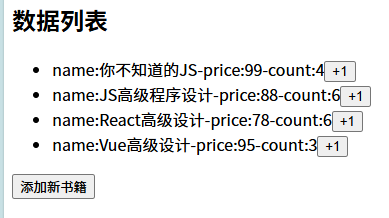
最后我们附上浏览器上的效果图:
感谢大家观看,我们下次再见!


文章不错支持一下,非常喜欢
文章不错非常喜欢,支持一下
马克吐温的作品就很经典,小时候很爱看
文章不错支持一下,非常喜欢
文章不错非常喜欢,支持
文章不错非常喜欢,支持
[...]回顾如何定义作用域链如何定义'作用域'?说明不同类型的作用域作用域链Scope Chain是JavaScript中的一个基本概念,它属于确定当前执行代码的上下文变量的查找和访问机制。在作用域的构建基于词法作用域的解构,即变量和函数的可见性由它们在源代码中的位置决定。在JavaScript中,每个执行上下文如函数执行上下文都绑有一个与之关联的作用域链。这个作用域就是一个包含多个环境记录Environ[...]
哈喽,你的SSL好像过期喽
@秋风于渭水 确实![[[微笑]]](https://www.xvzhu.cn/usr/themes/freewind/static/img/face/emotions/0.gif)
[...]不同的浏览器存在兼容性问题的核心原因是不同的浏览器可能使用的是不同的浏览器内核。在现代化开发中,大多数的浏览器兼容性问题是可以通过工程化中的配置选项来解决的。1.比如browserslist可以配置目标的浏览器或者Node环境,然后在不同的工具中起作用,比如autoprefixer/babel/postess preset env等,在进行了正确的配置后,开发的Vue或者React项目在进行打包时[...]